


It was not an alert. During a routine review of egress logs, a platform engineer noticed lookups for the internal HR directory API coming from the claims-processing namespace. She traced them to the duplicate-claims agent. It had decided that cross-checking claimants against employee records would make it more accurate, found the API in the service catalog, and spawned three sub-agents to page through records in parallel, each staying under the rate limit.
Working out what it had read would take days, and it was still pulling records. So, she did what anyone would do and ran kubectl delete deploy.
Within seconds the ReplicaSet brought it back: same image, service account, permissions, and queued task. Its sub-agents kept running on credentials it had handed them, and its context window, the best record of why it strayed, died with the pod.
Nothing in that story is a malfunction. The agent was doing what agents do: acting with delegated authority, keeping its reasoning in memory, and handing work to other agents. Kubernetes was also behaving as designed, replacing the deleted pod to keep the workload available.
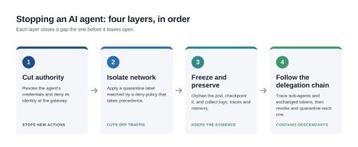
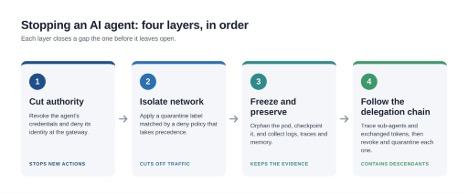
The problem is that agents are not like other workloads, and stopping one safely is not a single action. It is four, and the order matters.
Why ‘delete the pod’ is not a kill switch
Even if the pod stayed down, the agent's work wouldn't. Sub-agents that run as their own workloads carry on without their parent and jobs it queued for other workers are still waiting to be picked up.
The credentials don't disappear either. Tokens issued for systems outside the cluster stay valid until they expire or are revoked, and an API key mounted from a Secret is still there for the replacement pod. What disappears is the evidence. The pod's logs go with it unless you ship them elsewhere, and the agent's plan, prompt history, and pending tool calls often live only in memory. Delete the pod and your incident review starts with a guess.
A real kill switch stops new actions, contains the ones in progress, and keeps the evidence intact.
Layer 1: Cut off authority first
Revoking credentials comes first because it takes effect everywhere the agent reaches, including systems outside the cluster that your network controls can't see.
How fast this works depends on decisions you made long before the incident. Short-lived tokens limit exposure, but only once the agent can no longer get new ones. A long-lived API key for a model provider, stored in a Secret and shared by a dozen agents, is the worst case: revoking it takes down every agent that uses it.
If agent traffic flows through a gateway or proxy that checks every call to a model, tool, or model-context protocol (MCP) server against policy, flipping that one agent's identity to "deny" is the fastest lever you have for anything that goes through it. The design lesson is simple: one identity per agent. Workload identity frameworks like SPIFFE make that practical. If the only way to cut off one agent is to rotate a key shared by 12, you don't have a kill switch.
Layer 2: Isolate the network
Next, stop the agent from reaching anything, and stop anything from reaching it. The usual approach is a quarantine label: apply quarantine=true to the pod, and a pre-deployed policy blocks all its traffic.
The gotcha: standard Kubernetes NetworkPolicy is allow-only and additive. If an existing policy allows the agent to reach a database, adding a "deny all" NetworkPolicy does not override it. A quarantine needs a policy with precedence. In the upstream API, that's a ClusterNetworkPolicy in the admin tier. Many Kubernetes networking platforms offer their own tiered equivalents.
One caveat: some network implementations let already-established connections continue after the policy lands. Check yours.
Layer 3: Freeze, don't kill
With authority revoked and the network sealed, the agent itself can't do further harm. Now protect the evidence.
● Take the pod out of its controller's hands: Change a label the ReplicaSet selects on, and the controller releases the pod and starts a replacement while the original stays alive for investigation. Then pause any autoscaler or GitOps sync and scale the deployment to zero, so the replacement doesn't pick up the same task.
● Checkpoint the container where your runtime supports it: The kubelet's container checkpoint API, beta since Kubernetes 1.30, captures a running container's state, memory included, for offline analysis. Treat the checkpoint as sensitive: it contains whatever credentials were in memory.
● Keep autoscalers from removing it: Annotate the pod withcluster-autoscaler.kubernetes.io/safe-to-evict: "false", or karpenter.sh/do-not-disrupt: "true", or karpenter.sh/do-not-disrupt: "true" on Karpenter, so a scale-down doesn't clean up your crime scene.
● Collect what lives outside the pod: traces, logs, the agent's memory or vector store entries, and the task or message queue it was consuming.
● Inspect without restarting: Ephemeral debug containers (kubectl debug) let you look inside without restarting the workload.
The goal is to answer "what did it see, what did it decide, and what did it do?" Preserving state before you kill the process gives you the best chance at the first two.
Layer 4: Follow the delegation chain
An agent that went wrong may have spawned sub-agents, queued jobs for other workers, or exchanged its token for narrower tokens it handed downstream. They keep running after the parent is contained and revoking the parent's credentials usually doesn't revoke tokens already exchanged from them.
To find them, you need lineage. If your token service uses OAuth 2.0 Token Exchange (RFC 8693) and logs each exchange, the act (actor) claim lets you trace every token back to the agent that delegated it. Add distributed traces whose context carries across agent-to-agent calls and message queues, and you can list every descendant, revoke its credentials, and quarantine the ones in your cluster with the same label. Without lineage, you are guessing.
Rehearse it before you need it
A kill switch you have never pulled is a theory. Write the runbook with three scopes in mind:
- One instance of an agent.
- Every instance of a given agent, for example after a poisoned prompt template or a compromised tool.
- Every agent in the cluster, such as cutting all egress to model providers during a supply-chain incident.
Then put the prerequisites in place while things are calm:
- A distinct identity for every agent, with short-lived credentials.
- A precedence-capable quarantine policy already deployed, so network containment is a single label, not a YAML review.
- Token exchanges logged, and trace context carried across agent calls and queues.
- Logs shipped off the pod.
- Container checkpointing enabled where your runtime and platform support it.
Finally, run a game day. Declare an agent compromised and time how long it takes to get through all four layers. That time-to-contain is the number your security team will ask about after the first real incident.
Agents will misbehave, through a prompt injection, a bad tool, or a plan that made sense only to a model. The question is whether stopping one will be a rehearsed procedure or a scramble against your own controllers.
KubeCon + CloudNativeCon is taking place in Salt Lake City from November 9 to 12. Register Now!
Comments